v0.1.0 open source · CC BY-NC 4.0 · Windows

A converter that
shows its work.

Drop in audio, pick a format, press one button. Your sources are never every file to the Recycle Bin, registry backed up before it's touched — and a reason printed next to every single item.
Single 33 MB exe · no Python, Node, Java or browser · 35 self-tests

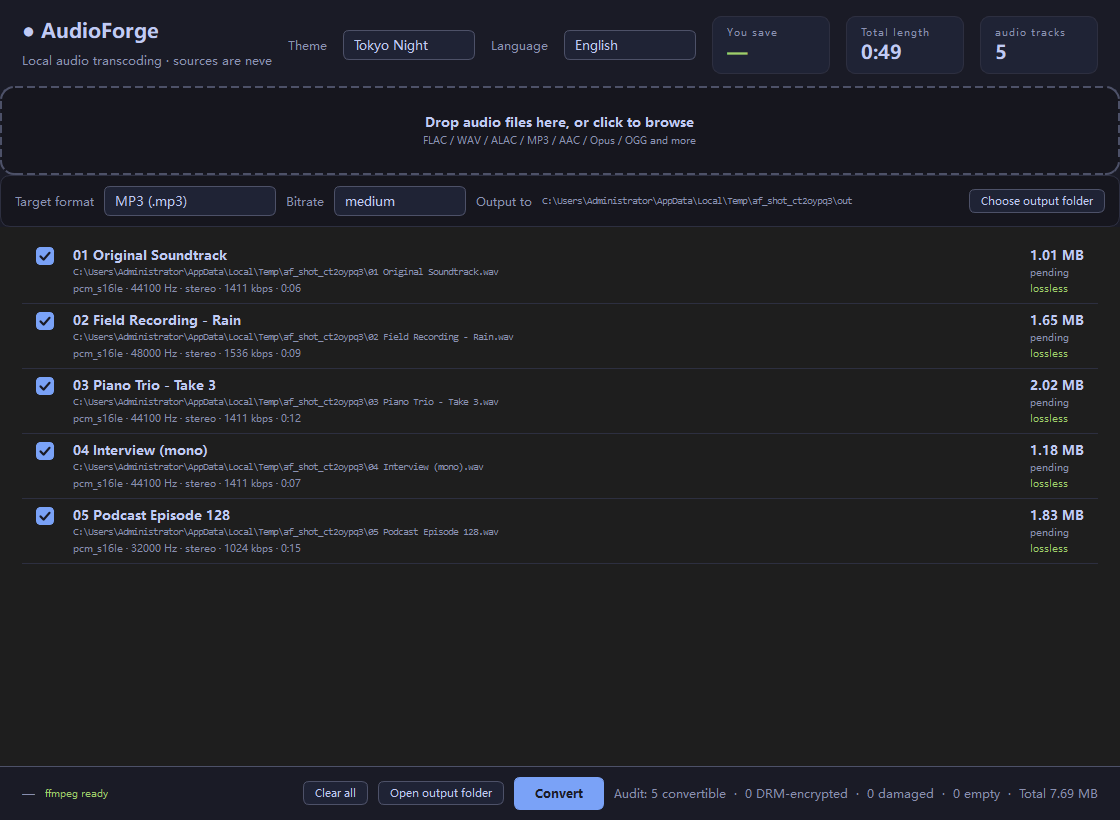
AudioForge showing five imported tracks with codec, sample rate, channels and duration
Every import is inspected with ffprobe — codec, sample rate, channels, duration, lossless or lossy.
7
target formats
6
colour themes, live switch
35
self-tests, real transcodes
0
files ever overwritten
Why it's built this way

The worst failure mode of a
transcoder is lying to you

It finishes, it looks successful, and the file is broken. So every output is read back and checked. Ten milliseconds is cheap insurance.

🔍

Probe before converting

No duration or sample rate means no conversion. Empty files, random bytes and text files renamed .mp3 are rejected with a stated reason.

♻️

Sources are read-only

Output always lands in a separate folder. Same names get numbered: song.mp3, song (2).mp3. There is no overwrite option, and there never will be.

✅

Verified round-trip

After each conversion the output is re-read with ffprobe and checked for codec, duration and lossless-ness. The self-test transcodes all seven formats for real.

🧹

Clean failure

Output is written to .part and only renamed on success. A failed run leaves nothing behind — no half-written file.

⏭️

Skips pointless work

Lossless to lossless is skipped with a reason: turning FLAC into WAV just swaps the container and doubles the size.

🔐

DRM: honest, not sneaky

KGM / VPR / QMC / NCM are recognised and grouped as unplayable. Calling them "damaged" would be a lie — the file is fine, it has DRM on it.

Seven targets

Pick a format, pick a bitrate

Input containers are unrestricted — anything ffprobe recognises works (FLAC / WAV / AIFF / M4A / MP3 / AAC / Opus / OGG / WMA / APE / WavPack …).

.mp3
MP3
libmp3lame · lossy · three bitrate presets
.m4a
AAC
aac · lossy · 192 kbps
.opus
Opus
libopus · lossy · 160 kbps
.ogg
Vorbis
libvorbis · lossy · quality preset
.flac
FLAC
flac · lossless
.m4a
ALAC
alac · lossless
.wav
WAV
pcm_s16le · lossless
Batch audit

How much of this pile
is actually junk?

Drop a folder in — it recurses the whole tree — or run AudioForge.exe --audit D:\Music.

  • ✓
    Convertible Real audio, with codec, sample rate, channels and duration read from the file.
  • ✕
    DRM-encrypted KGM / VPR / QMC / NCM. The file is intact — it just can't be played without the provider's app. Nothing is unpacked.
  • ✕
    Damaged / not audio Truncated FLAC, empty files, a text file renamed .mp3. Each with the specific reason.
  • ✕
    No "delete source" feature Not now, not later, not on request.
  • ✕
    No bundled codecs ffmpeg is yours to install. It isn't redistributed.
  • ✕
    No network, no telemetry Runs fully offline. Nothing about your files leaves it.
# what a conversion actually does cmd = build_cmd(src, dst_partial, target, bitrate) out_opts = ["-f", target.fmt, "-map_metadata", "0"] cmd = cmd[:-1] + out_opts + [dst_partial] # ^ explicit container: the temp file is # song.mp3.part, and ffmpeg can't # infer a muxer from ".part" # # ... run it ... if proc.returncode != 0: dst_partial.unlink() # nothing left behind # then read the result back and check it back = probe(dst) assert back.codec == expected assert abs(back.duration - src.duration) < 0.3
Look

Six themes, zero rebuilds

Switch in the top-right; the choice is written straight back to settings.yaml and survives a restart.

Tokyo Nightdefault
Rosé Pinesoft contrast
Inknear-black
Paperlight
Studio Lightwarm
Studio Darkneutral

Try it on a machine you care about

One exe, no install, no dependencies. Read the reasons it gives, then decide.

Licence: CC BY-NC 4.0 — free to modify and remix, attribution to Matou1118 required, non-commercial only. Full terms